 A dynamic island for GNOME
Everything,one hover away.
Music with synced lyrics, calls, a focus timer, reminders, a calendar, a clipboard shelf, your coding agents asking right there, and an assistant that installs and fixes things with the AI you already use. In a notch at the top of your screen.
Works on Linux with GNOME 46–51 · Windows coming soon
# Launch plan
- Record the demo video
- Post it on X, Threads and TikTok
- Answer the first comments
- Write the release notes 09:41
09:41The real island, running in your browser. Rest the pointer on it to open it, or tap it.
Your desktop, at a glance.
Isle turns the centre of the top bar into a black notch. At rest it shows the time and what is going on. Rest the pointer on it and it opens with spring physics; pass over it and it stays closed.
Just ask. Isle does it.
Press Super+I and say it, or type it, in English or Indonesian: play a song, find a file, put windows side by side, install an app, explain why the laptop is slow. It works step by step, with the AI you already use, and asks before it runs anything.
 Claude Code
 Codex
Codex- Antigravity
- English and Indonesian
- Speech on your computer
- A command waits for Run
- Carries on in the background
09:41Your coding agents ask. Right here.
When Claude Code or Codex wants to run something, answer from the island without leaving your work: Deny, Allow or, for Claude Code, Always. When one is done, the island says what it did.
- Claude Code
- Codex
- Deny, Allow, Always
- Says when it’s done
- Quiet while you’re in its window
09:41Your music, right at the top.
Spotify, YouTube in your browser, or any player, with its lyrics in time. The island widens and takes the cover’s colour; click a line to jump to it.
- Spotify and YouTube
- Any MPRIS player
- Synced lyrics from LRCLIB
- The cover’s colour
- Volume and output
Right where you look.
Volume, Caps Lock, charging, AirPods, meetings with Join, notifications with Reply and reminders appear in the notch instead of the middle of the screen. Hold the pointer on one to keep it.
- Charging and battery
- Bluetooth devices
- Meetings with Join
- Reply to notifications
- Privacy dots
- Recording timer
09:41And every page, one hover away.
A tab for each, in the same black notch. Pick one to open it on the demo at the top.
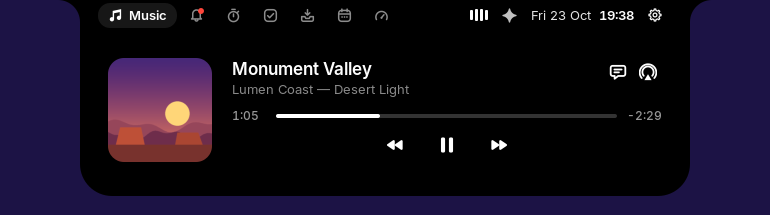
Music
Spotify, YouTube in your browser, or any player: cover art with the app’s icon, a scrubber and controls. Volume and output one click away.
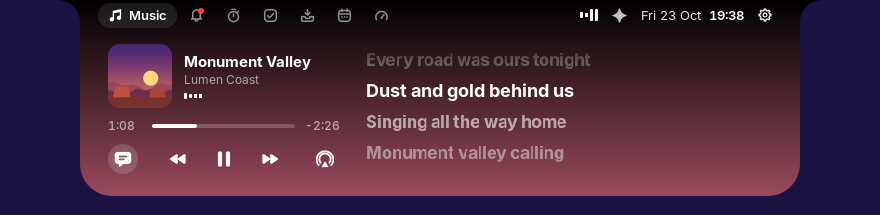
Synced lyrics
The line being sung, large and bright, with pauses as breathing dots. The island widens and takes the cover’s colour.
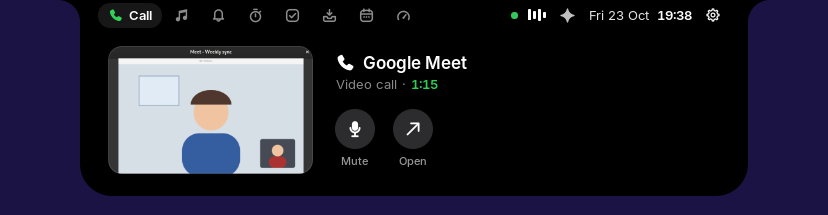
Calls
WhatsApp, Telegram, Meet or any app. The closed island shows how long the call has lasted; open it to see the call live and mute.
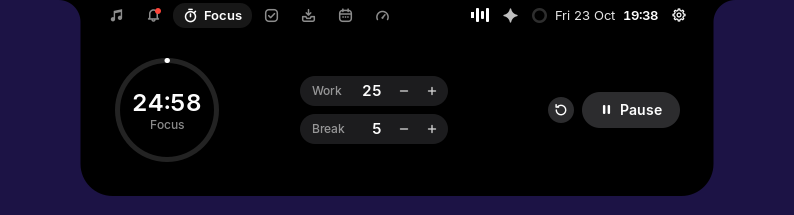
Focus
A Pomodoro timer with breaks and Do Not Disturb. Its ring and time stay in the closed island, even beside a song.
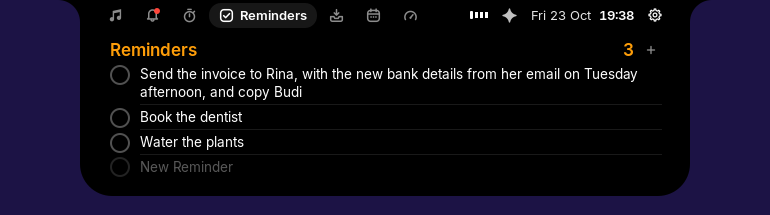
Reminders
A plain list. Add one, rename it in place, tick it off and it is struck through, then goes.
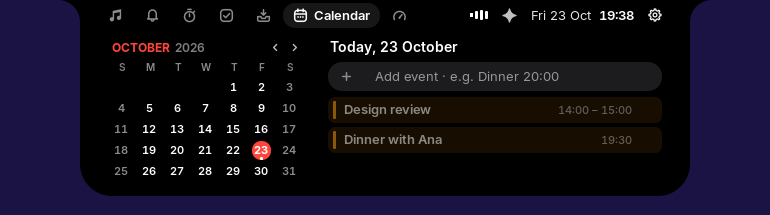
Calendar
Your Google and other calendars beside the month, events added in a line, and Join five minutes before a meeting.
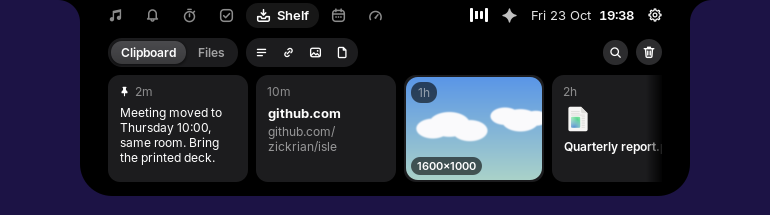
Clipboard shelf
Text, links, images and files you copy, with search, filters and pins. Super+V to paste. Password managers never land here.
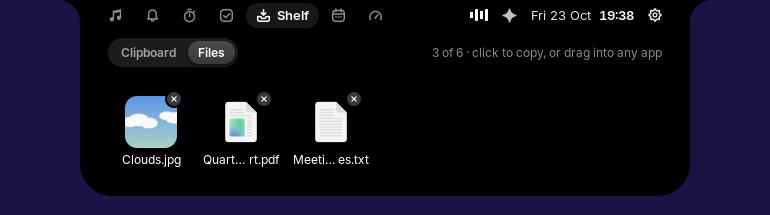
Files tray
Drop files on the island. They wait there, with thumbnails, until you drag them into any app or click one to copy it.
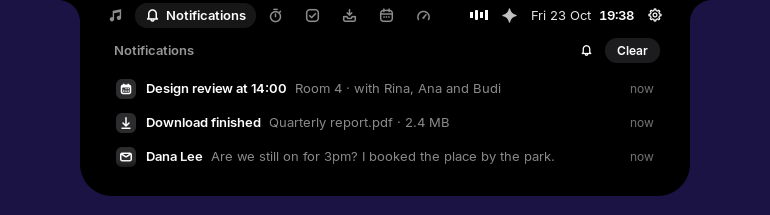
Notifications
GNOME’s notifications as a plain list, newest first, with Reply and Mark as read under the pointer, and Do Not Disturb a click away.
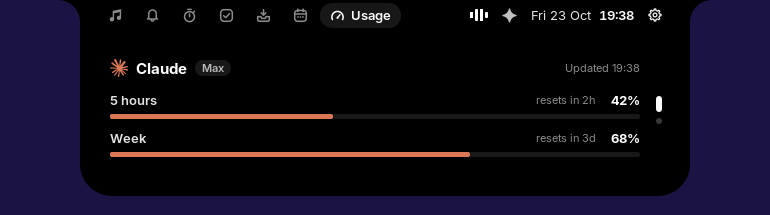
AI usage
How much of your Claude and ChatGPT plan limits is used, a bar for each and when it resets, with a warning as one nears its end.
Make it yours.
A bot of your own: eight shapes, from a circle to a cloud or a ghost, eleven colours or your own, and a glow round the island that matches it. Its eyes follow your pointer.
One command away.
Run it as yourself, then log out and back in. No root, no compiler, nothing to clone. For GNOME Shell 46 to 51 on a 64-bit Intel or AMD PC.
A GNOME Shell extension that turns the centre of the top bar into a black notch. At rest it shows the time and what is going on: a song, a timer, a call or a recording. Rest the pointer on it and it opens into pages for music, notifications, focus, reminders, the shelf, the calendar and AI usage.
GNOME Shell 46 to 51 on a 64-bit Intel or AMD PC: Ubuntu 24.04 to 26.10, Fedora 40 to 45, Debian 13 and Arch, among others. Check yours with gnome-shell --version.
Run curl -fsSL https://raw.githubusercontent.com/zickrian/isle/main/get.sh | bash in a terminal as yourself (not with sudo), then log out and back in. No root, no compiler and no cloning. Each release also has a .deb, an .rpm and an Arch PKGBUILD.
Yes. Isle is free and open source under the GPL-3.0-or-later licence. The code is on GitHub. If you would like to give something back, you can buy me a coffee.
The one you already use: Claude Code, Codex or Antigravity, signed in with your own account. Isle finds whichever is installed, and one you install later too. Speech is recognised on your computer, in English or Indonesian.
No. The AI only answers. Anything that changes your computer is a command you see in full, with what to know about it (your password, a script from the web, removing files), and it runs only when you press Run. Hidden folders like .ssh are never read.
There is no server and no telemetry. Your clipboard, reminders, events and chats stay in ~/.local/share/isle. It goes online only for lyrics and cover art, your Claude plan’s usage, a daily check for a new version, the speech model (once), and the AI you picked.
Its service uses about 10 MB of memory and no CPU while idle, with no polling. Closed and idle, the island draws no frames at all.
Run the install command again to update; your settings stay. To remove it, run ~/.local/bin/isle-uninstall rather than the Extensions app’s Remove button, so its service and hooks go too.